Panel-mounted instrument.
An instrument symbol with a solid horizontal line bisecting the circle, denoting an instrument mounted in the primary control panel and directly accessible to the operator from the front of the panel.
Three drawings included on a new account.
How it's drawn.
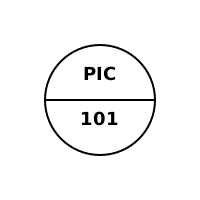
An instrument circle with a solid horizontal line across the middle. The line is the signal. It places the device on the primary panel or shared-display front, where the operator can reach it from the panel face. The tag reads the same as any bubble, function letters on top, loop number below. Drop the line and the instrument is field mounted. Switch the solid line to a dashed one and it moves behind the panel.
Typical usage.
Indicates HMI-side scope on legacy hardwired panels and primary front-of-board indicators on modern shared-display systems. The presence of the solid line tells the operator they can reach the instrument from the panel face during normal operations.
Telling it apart.
- A solid line means primary, operator-accessible. A dashed line through the same circle means behind-panel and not normally reached during operation.
- Panel mounting describes where the operator interface lives, not where the sensor sits. The measuring element can still be out at the process.
- A box, hexagon, or diamond around the circle changes the meaning to a shared-display or logic function, beyond a plain panel instrument.
Related.
Get the P&ID symbol cheat sheet.
One page of mounting conventions, so panel, field, and behind-panel bubbles are told apart at a glance.